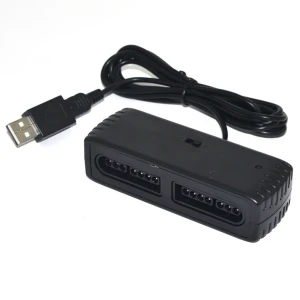


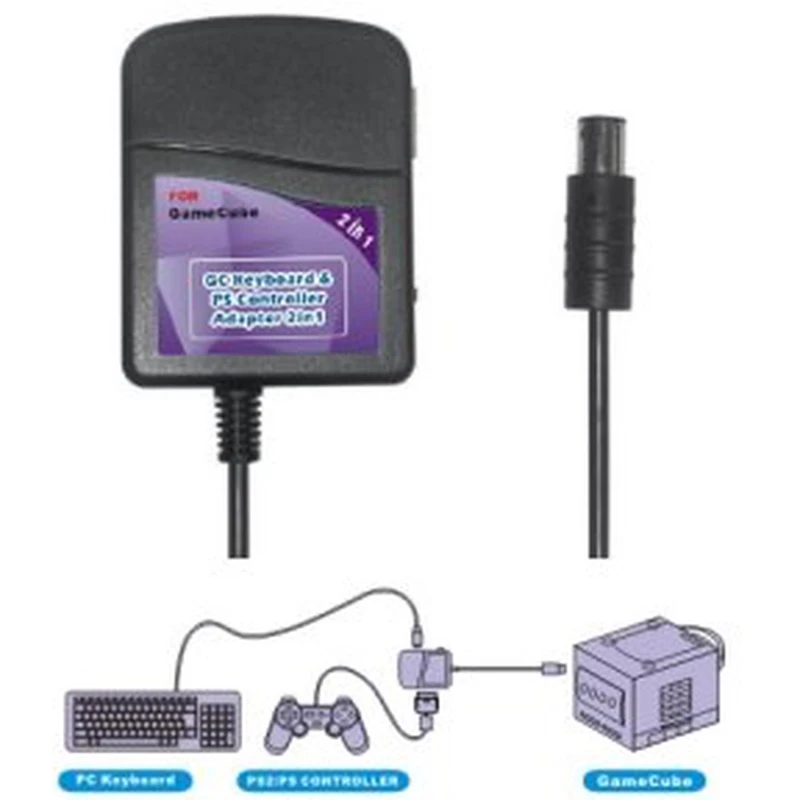
Tastatur- und Controller-Adapter PS2/PSX für Nintendo GameCube
Marke: Mayflash
Inkl. MwSt. (Exkl. MwSt.: 4,95€)






Der Tastatur- und Controller-Adapter PS2/PSX für Nintendo GameCube ist ein unverzichtbares Zubehör für GameCube-Fans, die ihre Steuerungsmöglichkeiten erweitern möchten. Mit diesem Adapter können Sie PlayStation 2 (PS2)- und PlayStation (PSX)-Controller sowie PC-Tastaturen direkt an die Nintendo GameCube anschließen und so ein vielseitigeres und komfortableres Spielerlebnis genießen.
Hauptmerkmale:
- Ermöglicht die Nutzung von PSX- und PS2-Controllern an der Nintendo GameCube-Konsole.
- Kompatibel mit PC-Tastaturen für eine einfachere Kommunikation in Spielen, die dies erfordern.
- Unterstützt alle Steuerungen, einschließlich der analogen, für eine präzise und vollständige Kontrolle.
- Besonders nützlich für Spiele wie Phantasy Star Online, bei denen die Tastatur die Interaktion verbessert.
Bekannte Einschränkungen:
- Die CAPS Lock-Taste ist bei der Verwendung der Tastatur mit diesem Adapter nicht aktiviert.
- Die NUM Lock-Funktion bleibt immer aktiv, was einige Tastaturfunktionen beeinflussen kann.
Typische Einsatzbereiche:
- Spieler, die PS2- oder PSX-Controller auf ihrer Nintendo GameCube nutzen möchten, ohne auf Funktionalität zu verzichten.
- Nutzer, die für die Kommunikation in Multiplayer-Spielen wie Phantasy Star Online lieber eine Tastatur verwenden.
- Alle, die eine praktische und kostengünstige Lösung suchen, um die Kompatibilität ihrer Konsole zu erweitern.
Kompatibilität:
- Kompatibel mit allen PSX- und PS2-Controllern, einschließlich analoger Steuerungen.
- Kompatibel mit standardmäßigen PC-Tastaturen für den Einsatz in GameCube-kompatiblen Spielen.
Dieser Adapter ist eine ausgezeichnete Wahl für alle, die die Möglichkeiten ihrer Nintendo GameCube mit Zubehör anderer Plattformen maximieren möchten. Obwohl er derzeit ausverkauft ist, empfehlen wir, auf zukünftige Nachlieferungen zu achten oder in unserem Shop nach ähnlichen Alternativen zu suchen.
- Kompatibel mit PSX- und PS2-Controllern an Nintendo GameCube
- Ermöglicht die Nutzung von PC-Tastaturen an der GameCube-Konsole
- Unterstützt analoge Steuerung für mehr Präzision
- Ideal für Spiele wie Phantasy Star Online
- Einschränkungen: CAPS Lock funktioniert nicht, NUM Lock immer aktiv
Kundenfragen & Antworten
Com afecta la limitació de les tecles CAPS Lock i NUM Lock en fer servir el teclat a Phantasy Star Online?
L'adaptador manté la funció NUM Lock sempre activa i no permet fer servir CAPS Lock, cosa que significa que algunes funcions d'escriptura i navegació poden veure's restringides, com ara l'entrada de lletres majúscules amb CAPS Lock o l'ús del teclat numèric per a determinades ordres. Això pot afectar l'experiència especialment en jocs amb xat actiu com Phantasy Star Online.
L'adaptador requereix alguna font d'alimentació externa o drivers per funcionar a GameCube?
No requereix font d'alimentació externa; s'alimenta directament pel port de control de la consola GameCube (5 V DC, sortida estàndard). Tampoc necessita drivers, ja que és plug & play: només cal connectar els dispositius compatibles i la consola detectarà automàticament el comandament o teclat.
Hi ha riscos d'incompatibilitat amb certs jocs o comandaments de PS2/PSX en fer servir aquest adaptador a la GameCube?
La majoria de jocs que admeten teclat o comandament extern a GameCube funcionen correctament, però pot haver-hi incompatibilitat parcial amb funcions avançades com la vibració, macros o comandaments llicenciats no originals. Els controladors dual shock originals i genèrics solen ser reconeguts, però models especials (com volants o arcade sticks) poden no ser compatibles.
How does the CAPS Lock and NUM Lock limitation affect use of the keyboard in Phantasy Star Online?
The adapter keeps NUM Lock permanently active and does not allow CAPS Lock, which means some typing and navigation functions may be restricted, such as entering uppercase letters via CAPS Lock or using the numeric keypad for certain commands. This can affect the experience, especially in chat-heavy games such as Phantasy Star Online.
Does the adapter require an external power supply or drivers to work on GameCube?
No external power supply is required; it is powered directly by the GameCube controller port (5V DC, standard output). It also does not need drivers, as it is plug & play: simply connect the compatible devices and the console will automatically detect the controller or keyboard.
Are there any incompatibility risks with certain games or PS2/PSX controllers when using this adapter on GameCube?
Most games that support a keyboard or external controller on GameCube work correctly, but there may be partial incompatibility with advanced functions such as vibration, macros, or non-original licensed controllers. Original and generic Dual Shock controllers are usually recognised, but special models (such as steering wheels or arcade sticks) may not be compatible.
How does the limitation of CAPS Lock and NUM Lock keys affect use of the keyboard in Phantasy Star Online?
The adapter keeps NUM Lock permanently active and does not allow CAPS Lock, which means some typing and navigation functions may be restricted, such as entering capital letters via CAPS Lock or using the numeric keypad for certain commands. This can affect the experience, especially in chat-heavy games such as Phantasy Star Online.
Does the adapter require an external power supply or drivers to work on GameCube?
No external power supply is required; it is powered directly by the GameCube controller port (5V DC, standard output). It also does not need drivers, as it is plug & play: simply connect the compatible devices and the console will automatically detect the controller or keyboard.
Are there any incompatibility risks with certain games or PS2/PSX controllers when using this adapter on GameCube?
Most games that support a keyboard or external controller on GameCube work correctly, but there may be partial incompatibility with advanced functions such as vibration, macros or non-original licensed controllers. Original and generic Dual Shock controllers are usually recognised, but special models (such as steering wheels or arcade sticks) may not be compatible.
Hur påverkar begränsningen av CAPS Lock och NUM Lock användningen av tangentbordet i Phantasy Star Online?
Adaptern håller NUM Lock alltid aktiv och tillåter inte användning av CAPS Lock, vilket innebär att vissa skriv- och navigeringsfunktioner kan vara begränsade, som att skriva versaler via CAPS Lock eller använda det numeriska tangentbordet för vissa kommandon. Detta kan påverka upplevelsen särskilt i spel med aktiv chatt som Phantasy Star Online.
Kundenbewertung schreiben
Kunden, die diesen Artikel gekauft haben, kauften auch


Ihre zuletzt angesehenen Artikel