

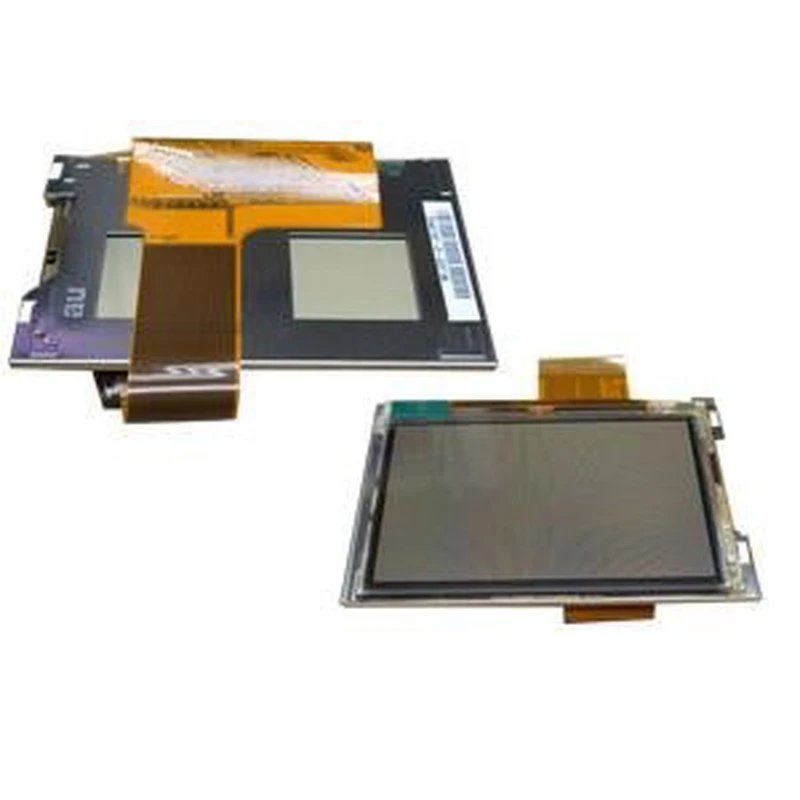
GBA LCD-Display: Ersatz für Game Boy Advance und GBA SP
Marke: satkit
Inkl. MwSt. (Exkl. MwSt.: 9,90€)






Das GBA LCD-Display ist ein unverzichtbarer Ersatz, um die Bildfunktion deiner Game Boy Advance- oder GBA SP-Konsole zu erhalten oder wiederherzustellen. Dieses Bauteil ist kompatibel mit den Modellen GBA, GBA SP und GBM und bietet eine effektive Lösung für beschädigte oder defekte Displays.
Dieser Ersatz ist für Nutzer gedacht, die das originale Display ihrer Konsole austauschen und die für diese klassischen Geräte typische Bildqualität zurückgewinnen möchten. Wichtig ist, dass der Einbau sorgfältig erfolgen sollte, vorzugsweise durch Fachpersonal, um Schäden während des Prozesses zu vermeiden.
- Kompatibilität: Konsolen Game Boy Advance, Game Boy Advance SP und Game Boy Micro (GBM).
- Displaytyp: Original-LCD für GBA.
- Funktion: Ersatz für beschädigtes oder defektes Display.
- Empfehlung: Professioneller Einbau zur Vermeidung von Schäden.
Für diesen Ersatz gibt es aufgrund der empfindlichen Installation keine Garantie, daher empfehlen wir den Einbau durch spezialisierte Techniker. Für dieses Produkt sind keine Rücksendungen möglich.
Mit diesem LCD-Display kannst du deine Lieblingsspiele wieder mit einem klaren und scharfen Bild genießen und das originale Spielerlebnis der Konsole beibehalten.
- Original-Ersatz für GBA, GBA SP und GBM-Displays
- Scharfe und klare Bildqualität
- Kompatibel mit Game Boy Advance und Varianten
- Einbau durch Fachpersonal empfohlen
- Keine Garantie und keine Rücknahme
Kundenfragen & Antworten
Requereix eines o equips especials per a la instal·lació d’aquesta pantalla LCD?
Sí, per instal·lar la pantalla es recomana disposar de tornavisos de precisió (tipus Tri-Wing i Phillips), pinces antiestàtiques i, en alguns casos, pistola de calor i cinta adhesiva conductora per assegurar les connexions. La manipulació sense eines adequades pot danyar la pantalla.
Quins riscos hi ha durant la instal·lació i quins són els danys més comuns?
El principal risc és la ruptura física de la pantalla o danys a la cinta flex (FPC) en aplicar força excessiva o plegats incorrectes. També poden aparèixer problemes de píxels morts o mal contacte si els connectors no s’alineen correctament.
Hi ha alguna alternativa amb més tolerància als errors o nivells de protecció per a usuaris menys experimentats?
Al mercat hi ha kits preassemblats i pantalles modernes tipus IPS amb adaptadors i guies més detallades, que ofereixen més tolerància en la instal·lació que les pantalles LCD convencionals com aquesta, però solen tenir un preu més elevat i requereixen modificacions addicionals.
Quines són les dimensions exactes i el tipus de connector que utilitza aquesta pantalla?
La pantalla té unes dimensions actives aproximades de 41 mm x 61 mm i utilitza un connector pla de 32 pins tipus FPC per integrar-se amb la placa base de la GBA original.
What are the exact dimensions and what type of connector does this screen use?
The screen has approximate active dimensions of 41 mm x 61 mm and uses a 32-pin FPC flat connector to integrate with the original GBA motherboard.
Does this LCD screen require special tools or equipment for installation?
Yes. To install the screen, it is recommended to have precision screwdrivers (Tri-Wing and Phillips types), anti-static tweezers and, in some cases, a heat gun and conductive adhesive tape to secure the connections. Handling it without the proper tools may damage the screen.
What risks are there during installation, and what are the most common types of damage?
The main risk is physical breakage of the screen or damage to the flex cable (FPC) if excessive force is applied or it is folded incorrectly. Dead pixels or poor contact can also occur if the connectors are not aligned correctly.
Is there an alternative with greater tolerance for errors or better protection for less experienced users?
There are pre-assembled kits and modern IPS screens on the market with adapters and more detailed guides, which offer greater tolerance during installation than conventional LCD screens like this one. However, they are usually more expensive and may require additional modifications.
Does this LCD screen require special tools or equipment for installation?
Yes. To install the screen, it is recommended to have precision screwdrivers (Tri-Wing and Phillips types), anti-static tweezers and, in some cases, a heat gun and conductive adhesive tape to secure the connections. Handling it without the proper tools may damage the screen.
What risks are there during installation and what are the most common types of damage?
The main risk is physical breakage of the screen or damage to the flex cable (FPC) if excessive force is applied or it is folded incorrectly. Dead pixels or poor contact can also occur if the connectors are not aligned properly.
Kundenbewertung schreiben
Kunden, die diesen Artikel gekauft haben, kauften auch


Ihre zuletzt angesehenen Artikel